


Reducing the Anxiety of Signal Retiming with Optimus, Part 2: Validation
.png)
In Part 1 of this series, we looked at how Optimus predicts what a timing plan is expected to do before it ever reaches the controller. Prediction tells you whether a plan is worth deploying and whether it will change things. The next part is validation: ensuring that every parameter in the timing plans is compatible with your controllers and objectives.
Deploying a timing plan without checking is a major act of faith. Any optimization is only as good as the data and objectives behind it, and there is always local knowledge that never makes it into a model: a nearby school’s dismissal time, a driveway that backs up onto the mainline, a movement the agency has committed to protecting. A plan can be mathematically sound and still wrong for the corridor. Validation is where the engineer’s judgment meets what Optimus produced.
Split Analysis: check every split in your timing plan
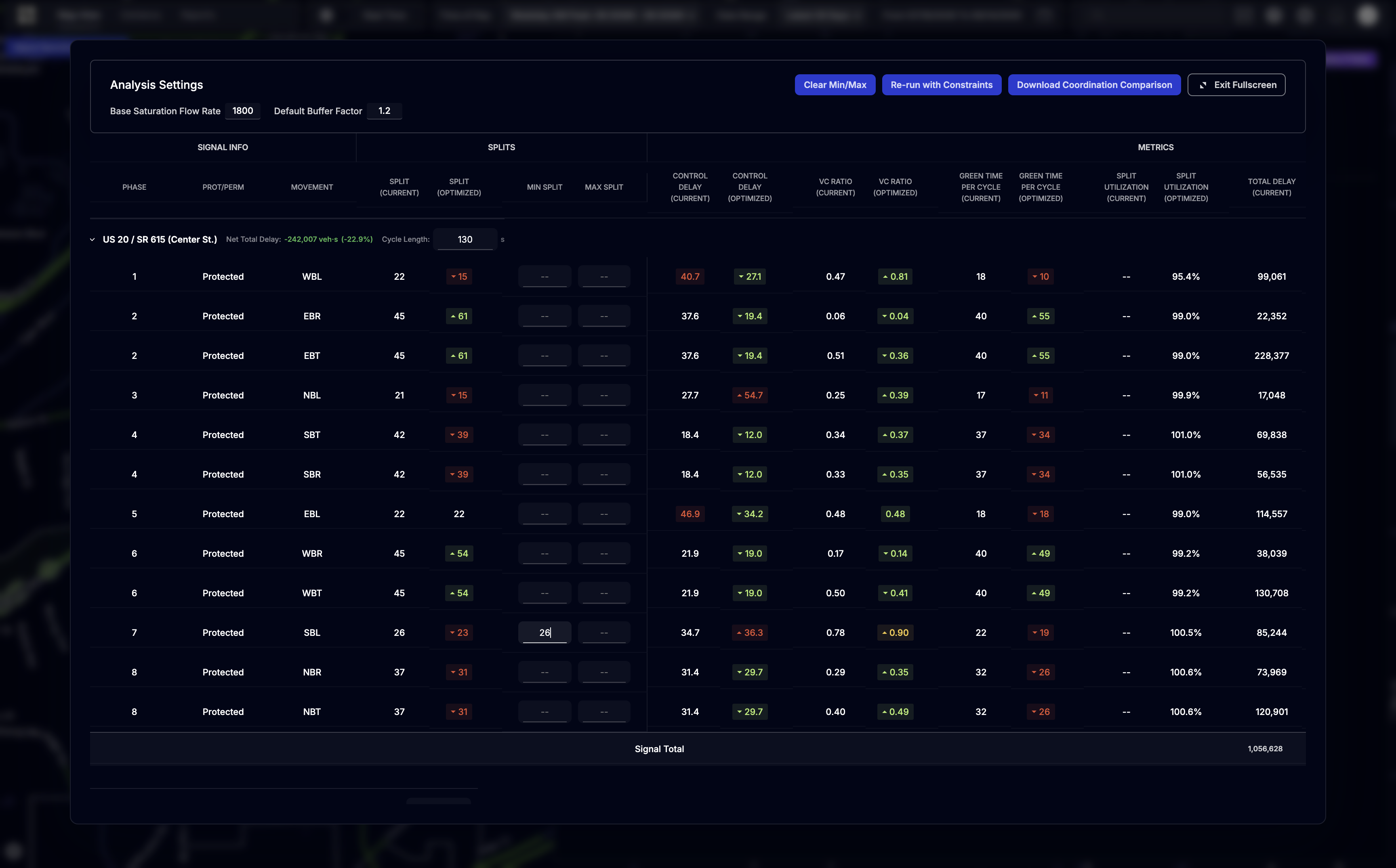
The Split Analysis tool breaks down every split that Optimus sets. For each phase at each intersection, it shows the split change, expected green time per cycle, saturation flow rate, capacity, volume, V/C ratio, and total delay.
You are looking for the phase that got pushed too far: the side street cut until its V/C ratio is unacceptable, the protected left dropped below what will clear its queue. Instead of discovering those in the field, you find them at your desk, before anything is deployed.
Fine-tuning: correct a split without rebuilding the plan
Finding a problem split is only useful if fixing it is easy. When a split isn’t right, you can use Optimus to fine-tune it. Set a minimum or maximum split on that phase and then re-run the plan. The re-run keeps everything you already approved, including the signals, reference period, objectives, and offset and cycle constraints, and applies only the new split bounds. Correcting one movement doesn’t throw the rest of your plan away.
The time-space diagram: check progression before deployment
Splits are easy to review in a table, but coordination isn’t. Changes to splits, cycles, and offsets all impact progression, and this can only be seen at a network-level view.
The interactive time-space diagram draws the predicted bands under the new plan and toggles directly back to the current one. That overlay is the fastest way to compare the old plan with the new and see exactly how the new plan impacts progression: whether the bandwidth held and where the arrivals on green landed.
.gif)
The payoff
Validation is what lets you build confidence in your timing plan, so you can deploy something you fully understand rather than something you are simply hoping about. Once you’re happy with your final plan, you can deploy it using our export capabilities and make an impact on your corridor.
Next in the series: Monitoring — using the Timing Plan Monitor to watch a plan perform against its prediction from the day it goes live, instead of waiting weeks for complaints or a follow-up study.
Are you retiming a corridor soon? Do it with confidence — contact our team.
Manage every traffic management system and data in one platform, without the need for new hardware.
.avif)

